Triggers and Actions: The Anatomy of a Flow
Every single automation you build, whether it’s a simple email alert or a complex multi-stage approval, is made of two fundamental building blocks: The Trigger and The Action.
Understanding how these two interact is the secret to moving from “I hope this works” to “I know exactly why this ran.”
1. The Trigger: The “When”
The Trigger is the event that starts your flow. A flow cannot run without a trigger. Think of it as the “If” in an “If-Then” statement.
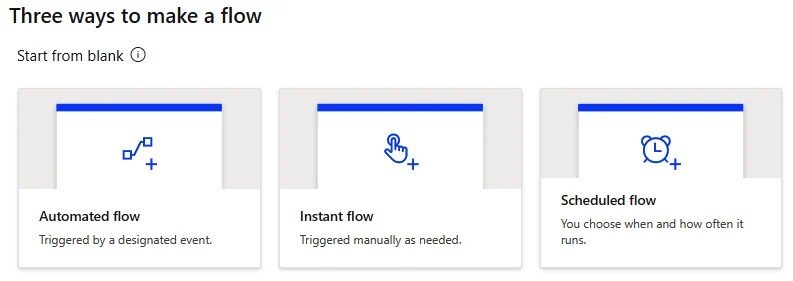
There are three main types of triggers you will encounter:
- Automated Triggers: These happen based on an event in a service. (Example: When a new email arrives or When a row is added to Dataverse).
- Manual (Instant) Triggers: These happen when a human clicks a button. (Example: A button inside a PowerApp or a “Manually trigger a flow” button in the mobile app).
- Scheduled Triggers: These happen at a specific time. (Example: Every Monday at 9:00 AM).
2. The Action: The “What”
The Action is what you want the flow to actually do once it has been triggered. This is the “Then” in your logic.
A single trigger can lead to dozens of actions. For example:
- Trigger: When a form is submitted.
- Action A: Send an approval email.
- Action B: Wait for the response.
- Action C: Update a SharePoint list with the result.
3. The Secret Sauce: Dynamic Content
The most powerful part of the Trigger/Action relationship is Dynamic Content.
When a Trigger fires, it carries “output data” with it. If the trigger is “When an email arrives,” the output data includes the Subject, the Sender, and the Body.
In your subsequent Actions, you can “pick” that data. You don’t have to type out the subject line; you just select the “Subject” token from the Dynamic Content menu, and Power Automate fills it in for every unique run.
Summary Checklist for Your First Flow
Before you hit “Save,” check these three things:
- Does my trigger have the right scope? (Am I looking at the right folder or table?)
- Are my actions in the right order? (You can’t update a row before you’ve created it!)
- Am I using Dynamic Content? (Avoid hardcoding names or IDs whenever possible.)
Ready to build?
The best way to learn is to try. A great “Starter Flow” is: Trigger: When an item is created in SharePoint -> Action: Post a message to a Teams channel.